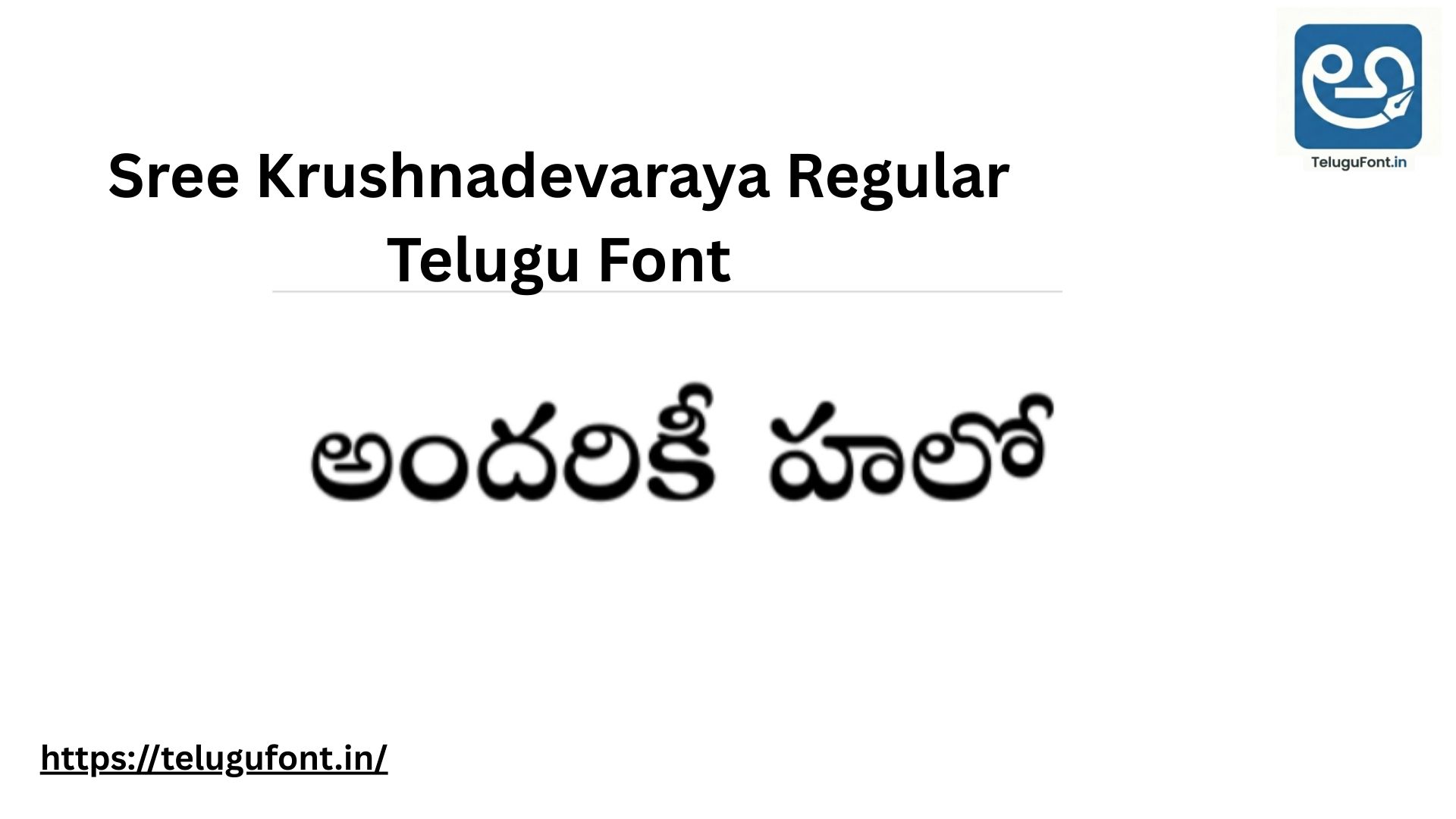
If you are designing a Telugu wedding invitation (Subhalekha) or a festival greeting, you cannot use a simple, plain font. You need a font that looks grand, traditional, and respectful. That is exactly what the Sree Krushnadevaraya Regular font delivers.
Named after the great emperor Sri Krishnadevaraya, who was famous for his love of Telugu literature, this font carries a Royal and Historical look. Its letters are designed with beautiful calligraphy curves that make any text look like an ancient, sacred manuscript.
Whether you are a professional DTP operator in Kakinada or a mobile editor creating a quick WhatsApp invitation, this font is an absolute must-have in your library. In this article, we will show you how to download, install, and use this majestic font.
| ⚡ Font Snapshot | |
|---|---|
| Font Name | Sree Krushnadevaraya Regular |
| Design Style | Royal / Traditional Calligraphy |
| Best Used For | Wedding Cards & Festival Banners |
| License | Free (Open Source) |
| Language | Telugu (తెలుగు) |
Why Choose Sree Krushnadevaraya Regular? (Design Magic) This font is not for everyday typing. It is a “Display Font” meant for special occasions. Here is why people love it:
- Royal Calligraphy: The letters have sharp, elegant curves that mimic traditional palm-leaf (Tala-patra) writing.
- Cultural Connection: Because of its traditional look, it instantly connects with readers emotionally. It is perfect for devotional and cultural events.
- Excellent Thickness: It is bold enough to be printed in gold foil on physical wedding cards without the letters breaking or looking too thin.
Live Font Preview Want to see the royal magic? Type a traditional greeting like “నమస్కారం” or a bride and groom’s name in the box below to see how beautiful it looks.
Test the “Royal Wedding” Look:
Best Use Cases for This Font Because of its rich traditional style, we highly recommend using this font for:
- Wedding Cards (Subhalekhalu): Use it for the main title (e.g., “వివాహ ఆహ్వాన పత్రిక”) and the names of the Bride and Groom.
- Festival Banners: Perfect for Sankranti, Ugadi, and Dasara flex banners and social media posters.
- Temple & Devotional Boards: Ideal for printing slokas, temple names, or spiritual book covers.
Technical Details
- Font Name: Sree Krushnadevaraya Regular
- File Size: Approx 140 KB
- Format: OpenType (.ttf / .otf)
- Category: Traditional / Calligraphy
How to Install Sree Krushnadevaraya Regular
For Windows (PC/Laptop):
- Click the secure download button at the bottom of this page.
- Open the folder where the file is downloaded.
- Right-click on the font file and click “Install”.
- Open Photoshop, CorelDraw, or MS Word, and select the font from the drop-down menu to start typing.
For Mobile (Android Users):
- Download the font file to your mobile storage.
- Open your favorite editing app (like Pixellab or Canva).
- Go to the font selection menu, click on “My Fonts” or “Upload Font,” and choose the downloaded file. Now you can make beautiful invitation videos on your phone!
📥 Download Sree Krushnadevaraya Regular
Get the most beautiful traditional font for your designs.
⬇ Download FontFree for Commercial & Personal Use | 100% Secure
Extended Guide: Designing Like a Pro with This Font
1. The Golden Rule of Color Combinations Because this font has a royal history, it looks best when paired with traditional Indian colors. If you are designing a poster or card, try these combinations:
- The Classic Subhalekha: Deep Maroon or Blood Red background with Gold or Yellow Text. This gives an instant “Pelli” (Wedding) vibe.
- The Devotional Look: Turmeric Yellow (Pasupu) background with Kumkum Red Text.
- Modern Royal: Dark Navy Blue background with Shining Silver Text.
2. Font Pairing (What to use for the details?) Sree Krushnadevaraya is very decorative. If you type the entire wedding card (including the address and time) in this font, it will become very hard to read.
- The Secret Formula: Use Sree Krushnadevaraya ONLY for the Main Headings and Names. For the date, time, venue, and address paragraphs, use a simple, clean font like Mallanna or NTR Regular. This contrast makes your design look 100% professional.
3. Enhancing the Font in Photoshop If you are a Photoshop user, you can make this font look even more premium.
- Double-click your text layer to open Blending Options.
- Add a slight Bevel & Emboss to give the letters a 3D gold-coin effect.
- Add a soft Drop Shadow to make the letters pop out from the background.
Troubleshooting: Letters Overlapping? Sometimes, in older versions of MS Word or PageMaker, the complex curves of this font might overlap.
- Solution: Simply select the text, open the Font settings (Ctrl+D), go to the “Advanced” tab, and increase the Spacing (Tracking) by 1 or 2 points. This gives the royal curves enough space to shine.
Frequently Asked Questions (FAQ)
Q1: Can I use this font for my YouTube channel logo? A: Yes! If your channel is about Telugu history, astrology (Bhakti), or traditional cooking, this font will make a fantastic, eye-catching logo.
Q2: Is Sree Krushnadevaraya free for commercial printing? A: Yes, this font was developed as part of an open-source initiative to promote the Telugu language. You can use it freely for commercial printing jobs, flex banners, and client designs without paying any license fees.
Q3: Does it support English letters? A: Like most dedicated Telugu fonts, it primarily focuses on the Telugu Unicode characters. If you type in English, it will usually fall back to a basic default font like Arial. It is strictly meant for typing in Telugu script.
Q4: Will it work with Google Input Tools? A: Absolutely. It is a fully Unicode-compliant font. You can type normally using Google Input Tools or any standard Telugu phonetic keyboard, and the words will automatically convert into this beautiful calligraphy.
Q5: Why is it named after Sri Krishnadevaraya? A: Sri Krishnadevaraya was the emperor of the Vijayanagara Empire and a great patron of Telugu literature (famous for saying “Desa bhashalandu Telugu Lessa”). Naming this grand, royal font after him is a tribute to his contribution to the language.
Conclusion If you want to bring tradition, respect, and beauty to your Telugu designs, Sree Krushnadevaraya Regular is the only font you need. It turns simple text into a piece of art.
Download it today, and give your next wedding card or festival greeting that perfect royal touch. If you face any issues while installing, drop a comment below, and we will help you out!